Introducing LazySQL: A Database Client for the Shell
I have always had an urge to keep my system memory as low as possible. It started out of necessity, my dev machine wasn’t powerful enough to spare any but the habit stuck even after I got faster hardware. IDEs and browsers kept growing, and the rest of the stack didn’t help. Docker, VS Code, a database client, a git client, Postman, plus whatever I was profiling that day. If a background job was under the microscope, I was sitting at 99% memory usage. And it wasn’t just memory — switching between windows, juggling terminals inside the IDE, tailing logs in emulators, that was its own ongoing cost.
I avoided Vim for years. The shame of not being able to close one was too much. But a couple of years ago I started self-hosting bits of my own observability stack instead of using the off-the-shelf ones, and that forced the issue. Small things at first — editing nginx configs, tweaking Dockerfiles, navigating log files. My config grew. Eventually I could do most of my work inside Vim. After I picked up tmux for building little dashboards, the toolkit felt complete. On my time off, I was running my whole workflow inside the terminal. Browsers started showing up late in the loop, which is what you’d expect from a TDD habit.
The one piece that wouldn’t fit was the database client.
Why a new database client
Database clients were the last sharp edge in my terminal-first setup, and they had more than one pain point:
- Most of the good ones are licensed. Each company I worked at had picked a different one depending on the stack — and if you were on a NoSQL like Dynamo, you were on whatever vendor tooling came with it.
- They are big. Most are general-purpose, with far more surface area than an application developer needs day to day.
- They don’t move like Vim. My hands have a strong opinion about motion keys, and editing queries in a non-Vim text box is friction that compounds.
- Credentials rotate. In most modern environments, even dev credentials live in a vault and get rotated. That means a constant loop of copy-paste-edit just to stay connected.
What I actually wanted was a hackable, minimal client with Vim bindings —
the same shape that lazygit has for git. There was one open-source TUI
client in the space, but the UI wasn’t quite to my taste and it was
missing the features I cared about. I had recently finished an
experimental Arch Linux installer, so building another thing from scratch
felt reasonable. LazySQL was born out of that.

What LazySQL is
LazySQL is a TUI written in Go on top of bubbletea
and vimtea. The current
release is alpha and focused on PostgreSQL, but the internals are
deliberately small and the driver layer is pluggable.
Three panes, one footer, no gui.
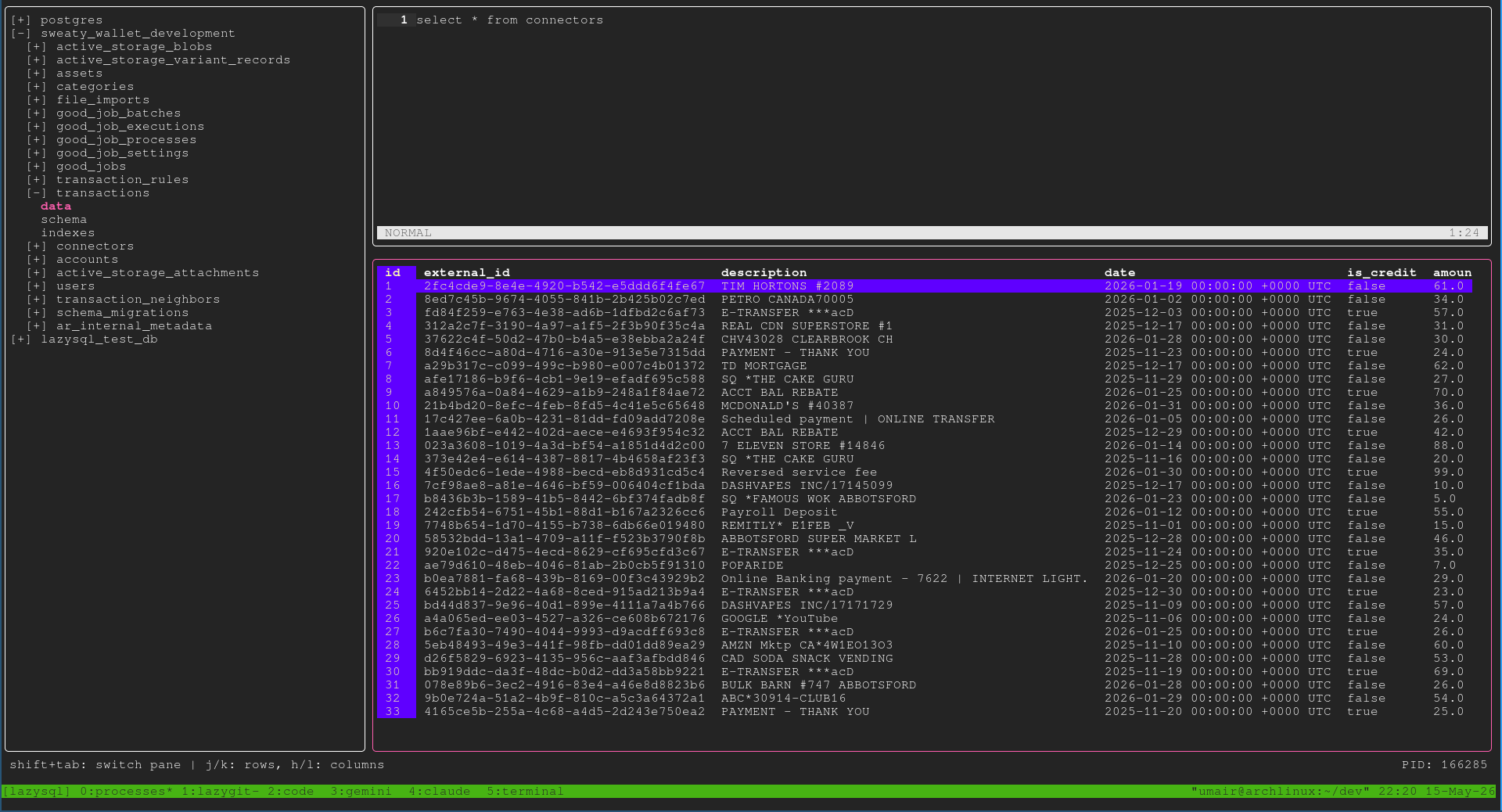
- Left: the explorer — databases, schemas, tables, and the table’s data / schema / indexes underneath them.
- Top-right: the query editor, a real Vim buffer.
- Bottom-right: the results viewer, scrollable in both axes.
The pieces I cared most about getting right
Three connection modes, including a command mode. You can configure a connection with static credentials, with a connection URL, or — the one I built this for — by pointing LazySQL at a shell command that prints credentials on stdout. The command runs every time you connect, which means rotating-secret workflows (Vault, AWS RDS IAM, GCP IAM, short-lived dev tokens) stop being a copy-paste loop and become a one-time configuration.
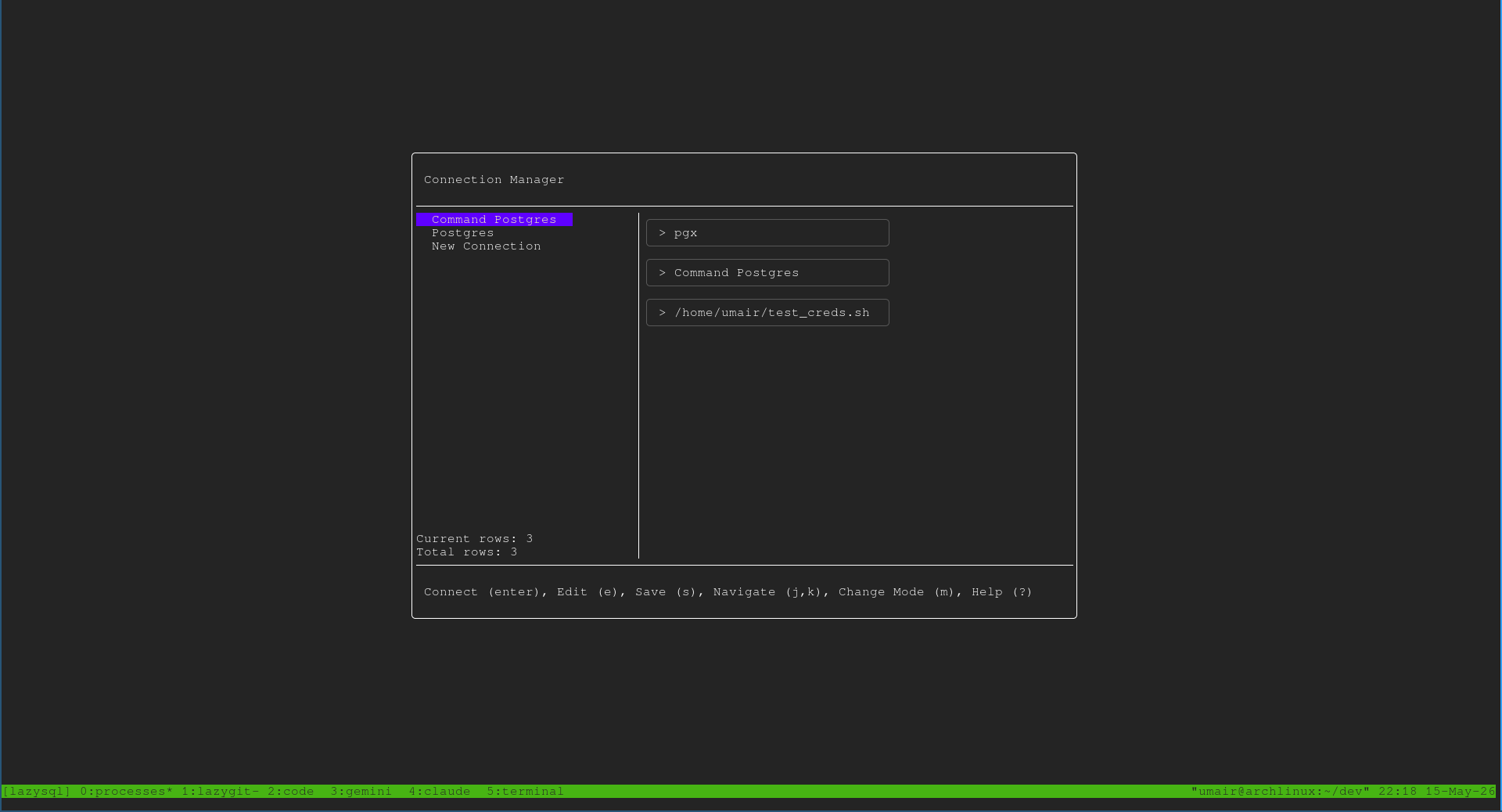
Credentials go in the OS keyring when available. Passwords and any URLs that contain credentials are stored in the platform keyring — macOS Keychain, Windows Credential Locker, or Linux Secret Service. If no keyring is available (headless Linux, for instance), LazySQL falls back to plain JSON. That fallback is a deliberate choice — it keeps the tool usable in environments where a keyring isn’t running — but it’s a fallback, not a default.
Bindings borrowed from Vim and lazygit. h j k l to move, ? for
help, Shift+Tab to cycle panes. The query editor is a full Vim buffer
via vimtea, so modes, motions, and visual selection all work the way
your fingers expect.
Explorer navigation borrowed from vim-fern.
l to expand a node, h to collapse. When you reach a leaf — a table’s
data, schema, or indexes — the result loads into the viewer pane. No
modal popups, no separate window.
Run-selection in the editor. Select a query in visual mode, hit
Ctrl+r, and that fragment runs. vimtea didn’t support this out of
the box, so it lives in a fork right now; a PR is open upstream.
No built-in LLM chat. This was intentional. I don’t think every app
having its own chat box is sustainable. Instead, each LazySQL session
writes a log file at ~/.config/lazysql/sessions/session-<PID>.log —
the queries you ran, the schemas you touched, the kind of context an
agent actually needs. The PID is in the footer. Pipe the file into
Claude, Gemini, or whatever you use:
cat ~/.config/lazysql/sessions/session-<pid>.log | claude "summarize what I was doing"
Logs from a normally exited session are cleaned up on quit. Logs from dead processes are cleaned up on the next startup. If you want to keep one, copy it out while the session is alive.
What’s next
A few directions I expect to push this in:
- More drivers. MySQL is next, then Dynamo. The adapter layer is the obvious place to extend.
- First-class hooks for LLM agents. Beyond the session log: things like running queries from an agent against a specific live instance, so the agent has somewhere to act, not just somewhere to read.
- The usual. Bug fixes, performance, and the requests that come in from people actually using it.
The repo is at github.com/umairabid/lazysql. It’s early — issues and PRs are welcome.